WordPressをダウンロードすると、wordpressというフォルダが一個手に入ります。
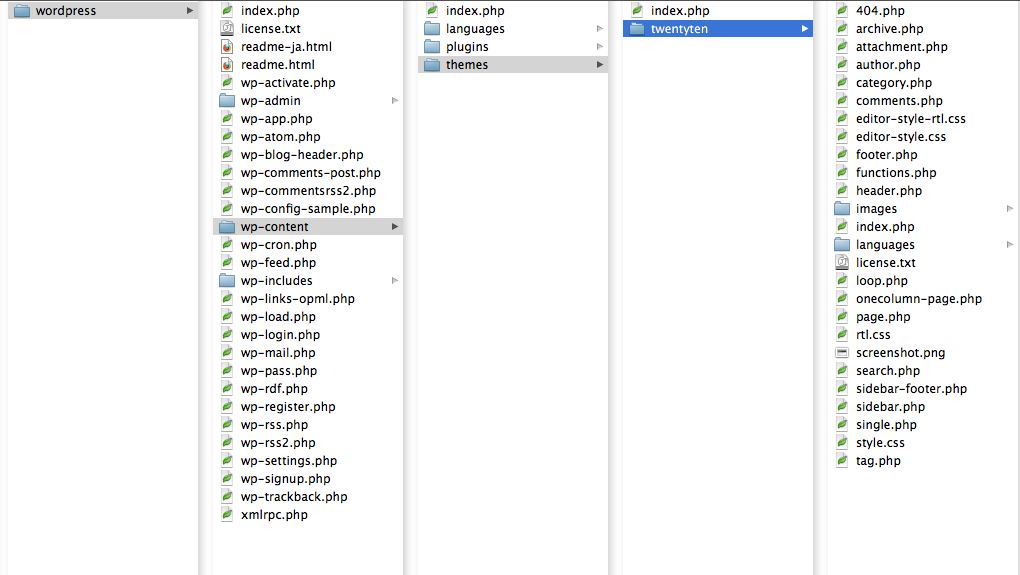
これらが、一番最初にどのように動いているのかを追ってみました。
僕は、https://nskw-style.com/wordpressにこれらのファイル一式を入れています。
そして、WordPress を専用ディレクトリに配置するを参考に、トップページURLをhttps://nskw-style.comに変更しています。
最初に動くphp、ルートのindex.php
https://nskw-style.comには、index.phpが置いてあり、これが読み込まれます。
/**
 * Front to the WordPress application. This file doesn't do anything, but loads
 * wp-blog-header.php which does and tells WordPress to load the theme.
 * WPの入り口です。このファイルは何もしないけど、wp-blog-header.php(テーマ読み込みをさせるファイル)を読み込むよ。
 *
 * @package WordPress
 */

/**
 * Tells WordPress to load the WordPress theme and output it.
 * WordPressにテーマをロードしてね。そして、それをWP_USE_THEMESにtrue定義してね
 *
 * @var bool
 */
define('WP_USE_THEMES', true);

/** Loads the WordPress Environment and Template */
require('./wordpress/wp-blog-header.php');
この中にあるphpのコードは2行で、一行目は、
define('WP_USE_THEMES', true);
で、WP_USE_THEMES(テーマが使われているかの真偽)にtrueを指定しています。
のちのち、wordpress/wp-includes/template-loader.phpの中で、
もしtrueならURLに応じてsingle.phpなどを表示し、
falseならRSSや検索ロボット、トラックバックだけは動かす、
という指定をするところで使われるみたいです。
*この記事の最下部参照。
2行目は、
require('./wordpress/wp-blog-header.php');
で、wordpressフォルダにある、wp-blog-header.phpへGO!の指令を出しています。
このindex.phpからwp-blog-header.phpへのワンクッションがあることで、https://nskw-style.com/wordpressにWPをインストールしつつ、ブラウザに打ち込むURL的にはhttps://nskw-style.comでOKなように指定できる、ということだと思います。工夫です。
参考:wp-includes/template-loader.phpの中身
/**
 * Loads the correct template based on the visitor's url
 * @package WordPress
 */
if ( defined('WP_USE_THEMES') && WP_USE_THEMES ) // WP_USE_THEMESがtrueなら
	do_action('template_redirect'); //pluginとか作るときのアクションフックを発行

// Process feeds and trackbacks even if not using themes.
// ロボット、フィード、トラバはfalseでも処理する
if ( is_robots() ) :
	do_action('do_robots');
	return;
elseif ( is_feed() ) :
	do_feed();
	return;
elseif ( is_trackback() ) :
	include( ABSPATH . 'wp-trackback.php' );
	return;
endif;

 // WP_USE_THEMESがtrueなら、それぞれのURLに従って正しいファイルを読み込む
if ( defined('WP_USE_THEMES') && WP_USE_THEMES ) :
	$template = false;
	if     ( is_404()            && $template = get_404_template()            ) :
	elseif ( is_search()         && $template = get_search_template()         ) :
	elseif ( is_tax()            && $template = get_taxonomy_template()       ) :
	elseif ( is_front_page()     && $template = get_front_page_template()     ) :
	elseif ( is_home()           && $template = get_home_template()           ) :
	elseif ( is_attachment()     && $template = get_attachment_template()     ) :
		remove_filter('the_content', 'prepend_attachment');
	elseif ( is_single()         && $template = get_single_template()         ) :
	elseif ( is_page()           && $template = get_page_template()           ) :
	elseif ( is_category()       && $template = get_category_template()       ) :
	elseif ( is_tag()            && $template = get_tag_template()            ) :
	elseif ( is_author()         && $template = get_author_template()         ) :
	elseif ( is_date()           && $template = get_date_template()           ) :
	elseif ( is_archive()        && $template = get_archive_template()        ) :
	elseif ( is_comments_popup() && $template = get_comments_popup_template() ) :
	elseif ( is_paged()          && $template = get_paged_template()          ) :
	else :
		$template = get_index_template();
	endif;
	if ( $template = apply_filters( 'template_include', $template ) )
		include( $template );
	return;
endif;


コメント
コメント一覧 (3件)
[…] こちらのサイトに書かれていました。 […]
[…] トがとても参考になりました。 参考サイト:https://nskw-style.com/2010/wordpress/php/how-wp-works-01.html […]
[…] ワードプレスが動くとき、どんなphpが動いているか1:ルートのindex.php […]